Curated pick
0.0
Feels like magic
Squiggle Golf
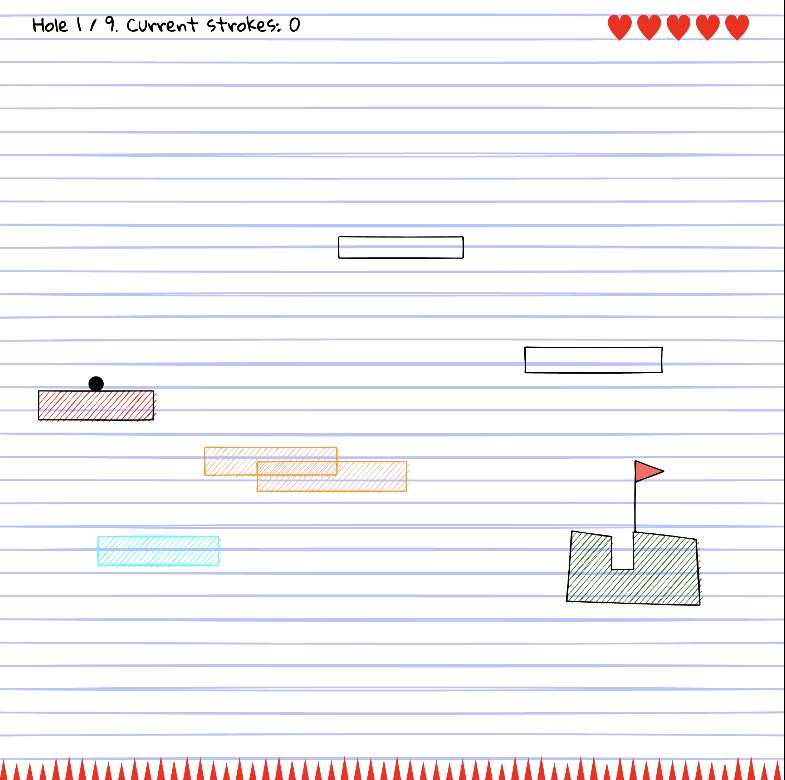
A charming hand-drawn physics mini golf game! easy click-and-drag controls, and cozy doodle graphics.
#No Login#Free
FreeFree to use
No LoginJump right in
WebWorks in browser
ShareablePerfect to share
Preview Squiggle Golf
A quick look before you open the app.
No login needed
A tiny daily golf toy that redraws the whole course every day.
Squiggle Golf is intentionally small. When you land on the page, there’s almost nothing to learn: a big “Play today’s course!” button, a one‑line how‑to, and the date. You click in, drag to aim, release to hit, and immediately watch the ball obey real physics inside a world that looks like it was scribbled with a marker.
Under the hood, it’s built with Matter.js for simulation and Rough.js for that wobbly, hand‑drawn aesthetic. In practice, that means no two days feel the same: the layout, the edges, the bounces and awkward angles all change, but the controls remain comfortably simple. You’re always one drag away from a new attempt.
Instead of trying to be a full sports sim, Squiggle Golf behaves more like a daily sketch: quick, imperfect, and ephemeral. The presence of “Play yesterday’s course” adds a small time‑travel twist—you get one last shot at the previous day’s drawing before it slips away into the archive of your memory.
How to use it
1. Open the Squiggle Golf page in your browser and click “Play today’s course!”.
2. Move your mouse to set the direction and strength of your shot, then click and drag to aim.
3. Release the mouse button to hit the ball and watch how it bounces and rolls.
4. Adjust your angle and power based on how the ball behaved, then take another shot toward the hole.
5. After finishing, optionally try “Play yesterday’s course” for a second tiny challenge, then come back tomorrow for a brand‑new layout.
Use cases
Take a 2‑minute break between tasks and clear today’s course
Share the link with friends and compare scores on the exact same daily layout
Use it as a warm‑up ritual when you open your browser each morning
Showcase to students how physics engines and sketchy rendering libraries can make playful web toys
Use it as inspiration for daily‑generated game jams or creative coding challenges
Pros
Simple, no‑friction gameplay that works instantly in the browser
Fresh, auto‑generated course every day for repeatable micro‑sessions
Charming, sketch‑style visuals that feel like a living notebook doodle
Great example of combining physics engines and creative rendering libraries
Perfect as a quick, low‑commitment daily distraction or ritual
Cons
Currently very minimal: no scoring history, social features, or progression
Being in alpha means visuals and UX may still be rough around the edges
No mobile‑optimized controls explicitly advertised, so experience may be best on desktop
Players wanting long sessions or deep mechanics may find it too light
Daily generation is fun but not configurable—no custom course editor yet
Updates
We refresh app notes as tools change, especially around pricing, login requirements, and output quality.
Free to tryNo account requiredBest fit: People who like tiny daily rituals, playful physics experiments, or quick “one more shot” games during a break.